Free while we launch
Always swipe the right card.
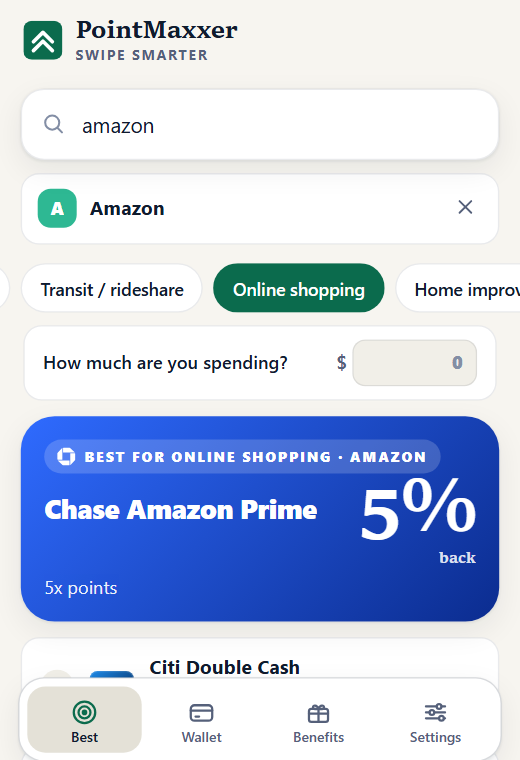
Tell PointMaxxer where you're shopping and it shows which of your credit cards earns the most there, counting bonus categories, caps and your bank's merchant offers. Then it makes sure your card perks never go to waste.
- No sign-up
- No bank login
- Works on phone and laptop
Covers the cards you carry
Your wallet is probably already in here.
From everyday cash back to premium travel cards, with rotating categories, spending caps and bank travel portals handled for you.
- Chase
 American Express
- Citi
 Capital One
- Bank of America
 Wells Fargo
 U.S. Bank
- Discover
- Barclays
- Synchrony
…and 15 more banks and credit unions. Missing yours? Add it as a custom card in a minute.
How it works
Know in a second. Not after checkout.
Add the cards you own
Pick them from the list, or add a custom card with its own rewards. Your wallet stays on your device.
Say where you're buying
Type a store, or let the browser extension read the site you're on. Add the amount if you like.
Swipe the winner
See the best card and why, including caps, rotating categories, portals and offers you've added.
What you get
Built to earn you more, quietly.
Your whole wallet, in one place
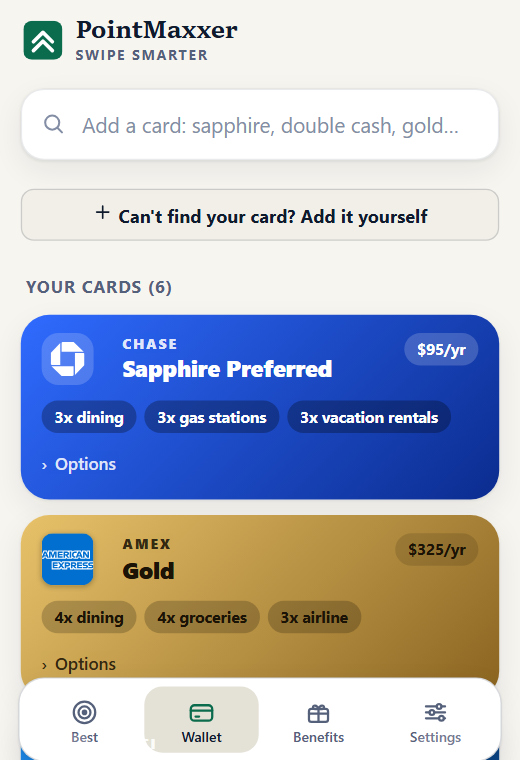
Add cards in seconds, with the bank marks you recognise. Annual fees, bonus categories and options sit under each card.
- Search by name: sapphire, double cash, gold…
- Add your own card if yours isn't listed
- Syncs between phone and laptop with a short code
Use the credits you pay for
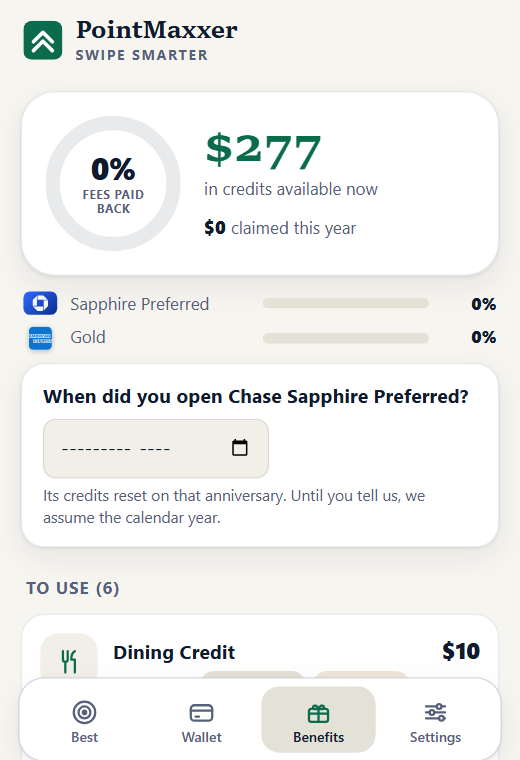
Statement credits for travel, dining and streaming quietly expire. PointMaxxer tracks them by card and nudges you before they reset.
- See how much of your annual fee you've earned back
- Reminders you can turn off
- Follows each card's own anniversary
Offers counted, and flagged
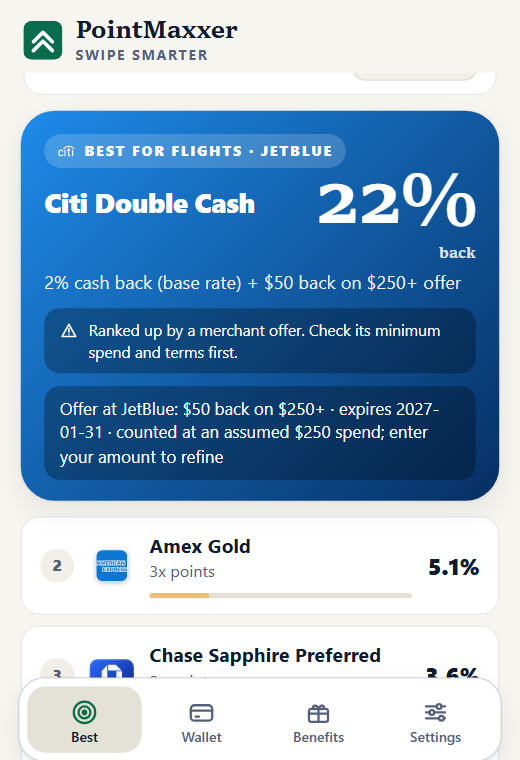
Merchant offers lift a card's ranking, with a clear reminder to check the minimum spend and terms. An optional helper can add your bank's offers for you in one click.
- Offers you add feed straight into the ranking
- Off until you turn it on and approve it
- Runs only on your bank's own offers page
Bank offers helper
Add every offer without the clicking.
An optional helper on your bank's own offers page lists every merchant offer and adds the ones you pick. It works with five banks today.
- Chase
- American Express
- Citi
- Bank of America
- U.S. Bank
You sign in to your bank yourself. PointMaxxer never sees or stores your password.
Privacy first
Your money stays your business.
PointMaxxer only needs the names of your cards. That's what makes it safe to use.
No bank login, ever
The core app never touches your bank. It never asks for a username, password or account number.
Card names, not card numbers
No numbers, expiry dates or security codes. Just which cards you carry.
Encrypted sync we can't read
Sync is optional. Your data is encrypted on your device first, with a key only you hold.
No ads, no ad tracking
Only anonymous usage counts, which you can switch off. No ad networks, and we never sell or share your data.
No account to create
Open it and go. Your wallet lives on your device, and you can erase it any time.
A plain-English policy
Read exactly what is stored and where in our privacy policy.
Pricing
Free while we launch.
PointMaxxer costs nothing right now: no sign-up, no card, nothing locked. We want to find out what's useful before we ask anyone for money.
Free
Everything works. Nothing is held back.
- Best card for any store or category
- The browser extension and the phone app
- Bank offers helper and device sync
- Statement-credit reminders
Paid plans
We'd add simple paid plans to keep it running.
- At least 30 days' notice before anything changes
- A founding deal for people who start now
- What you've saved is never taken away
Guides
Best card by category.
Which credit card earns the most on groceries, gas, dining and more? Ranked from issuer-published rates, with the assumptions shown.
FAQ
Questions
Is it really free?
Yes. There's no sign-up, no card and no locked features. We're launching it free to learn what people actually use.
Will it stay free?
We may add paid plans later if enough people find it worth paying for. If we do, we'll announce it at least 30 days ahead, people who started early get a founding deal, and your wallet and settings stay yours.
Does PointMaxxer log in to my bank?
No. The core app never touches your bank. The optional offers helper only runs on your bank's own offers page after you switch it on and approve it in your browser, using the session you already signed in to. It never sees or stores your password.
Is adding offers this way allowed by my bank?
It does what you could do by hand, only faster, but some banks' terms restrict automation, so it's optional and your choice. It's off until you turn it on.
Which cards and banks does it cover?
The major US cards: Chase, Amex, Citi, Capital One, Bank of America, Wells Fargo, US Bank and many more. If yours is missing, add it as a custom card in a minute. The offers helper works with Chase, Citi, US Bank, Bank of America and Amex.
How do I get the browser extension?
The Chrome extension is going through review. In the meantime, the web app does the same ranking, and you can add it to your phone's home screen. This page will link to the extension as soon as it's available.
Who is behind it?
PointMaxxer is built by one person and is independent: it isn't affiliated with, endorsed or sponsored by any card issuer or bank. Questions or ideas are welcome at [email protected].
Stop leaving points on the table.
It takes a minute to add your cards. After that, the right card is one glance away.